
A local SIM card or eSIM gives you mobile data and an Indonesian phone number for maps, ride-hailing, restaurant bookings, messages, and travel updates in Bali. The right option depends on your phone, trip length, data use, and where you plan to travel.
This guide explains what to check before you buy, how airport pickup works, what the current plans include, and which detailed guides to read if you need help choosing a network or setting up an eSIM.
Quick answer: how to buy a SIM card in Bali
- Check that your phone is unlocked.
- Choose between an eSIM and a physical SIM card.
- Select a data package based on your trip and expected use.
- Order online before arrival or choose a plan after you land.
- Bring the passport and phone used for registration when you collect your order.
- Complete registration and activation with staff, then test mobile data before leaving the counter.
If you want to compare all available options first, see the current Bali SIM and eSIM plans.
What is the best way to get mobile data right after landing in Bali?
Preorder a compatible local SIM or eSIM and collect it after Customs if you need Maps, Grab, Gojek or WhatsApp before leaving Ngurah Rai Airport. This gives you time to compare current plans before flying, but registration, device checks and activation still happen under the operator’s requirements. If you can use airport or hotel Wi-Fi first, buying later from an operator outlet in town is also reasonable.
For the current pickup point, price range and what to bring, read Where to Buy a SIM Card at Bali Airport.
Do you need a local SIM card in Bali?
You can use international roaming or rely on Wi-Fi, but both have trade-offs. Roaming may be convenient for a short visit, although the price and data allowance depend on your home carrier. Hotel and café Wi-Fi can help, but it does not follow you when you need directions, request a Grab or Gojek ride, contact a driver, or travel between towns.
A local tourist SIM is useful when you want mobile data and an Indonesian number. That number can also be practical for local calls and services that send an Indonesian OTP. For a closer comparison, read eSIM roaming vs a local SIM card in Bali.
Choose between an eSIM and a physical SIM card
An eSIM works without inserting a plastic card, but your phone must support eSIM and be carrier-unlocked. A physical SIM is suitable for unlocked phones with a compatible SIM slot. Neither format guarantees better coverage or speed by itself; performance depends on the operator, your location, your device, and current network conditions.
What our 2026 sales data shows: In an analysis of more than 3,500 classified connectivity units sold from April through September 2026, approximately 89% were eSIMs and 11% were physical SIMs. This is our customer sales mix, not an eSIM adoption rate for all Bali tourists. Read the methodology and full Bali Tourist Connectivity Trends report.
If you are unsure which format fits your phone, use the eSIM or physical SIM comparison. iPhone users can also follow the Bali eSIM setup guide for iPhone.
Check these points before ordering
- Carrier lock: a phone locked to your home carrier may reject an Indonesian SIM or eSIM.
- eSIM support: confirm the exact device model and regional variant, not only the model family.
- SIM slot: some phones sold in certain countries do not have a physical SIM tray.
- Network bands: your phone must support the selected Indonesian operator’s bands.
- Registration details: use accurate passport and device information.
How much data should you buy?
Light users who mainly send messages, check maps, and make occasional bookings may need only a small package. Regular social media use, video calls, hotspot use, and frequent video streaming consume much more data. Choose for your real habits instead of assuming that every traveller needs the largest package.
For practical usage examples, see how much mobile data tourists need in Bali.
Current Bali SIM and eSIM plans
The store currently lists 3GB, 10GB, 13GB, 19GB, 26GB, 34GB, 53GB, 68GB, 103GB, and 152GB options. Plans are valid for 28 days from activation. Operator availability includes XL, Tri, and IM3 Indosat, subject to the selected package and network availability.
At the time of this review on 27 October 2026, the online catalogue showed prices from Rp 50,000 to Rp 900,000 across the available eSIM and physical SIM variations. Format-specific prices can differ, so treat the product page and checkout as the current source of truth.
| Data | Verified catalogue price | Plan page |
|---|---|---|
| 3GB | Rp 50,000 | View 3GB plan |
| 10GB | Rp 100,000 | View 10GB plan |
| 13GB | Rp 125,000–150,000 | View 13GB plan |
| 19GB | Rp 150,000–200,000 | View 19GB plan |
| 26GB | Rp 200,000–250,000 | View 26GB plan |
| 34GB | Rp 250,000–300,000 | View 34GB plan |
| 53GB | Rp 300,000–350,000 | View 53GB plan |
| 68GB | Rp 350,000–450,000 | View 68GB plan |
| 103GB or 152GB | Check the selected variation | View all plans |
Several product URLs contain older quota numbers even though the product names and descriptions have been updated. Use the visible product name, selected variation, and checkout price rather than interpreting the legacy URL slug.
Which mobile network should you choose?
No operator is best in every part of Bali. Coverage can change between the airport, Kuta, Ubud, Canggu, the Bukit peninsula, and more remote areas. Your device and local network load also affect the result.
Choose based on where you will stay and travel, not on an absolute “fastest network” claim. The guide to Bali telecom operators explains the main differences. You can also read the focused Telkomsel vs XL Axiata comparison.
Where to buy a SIM card in Bali
You can buy from an airport counter, an operator store, or another authorised seller. An airport pickup costs more than some city-shop offers in exchange for immediate connectivity and help with registration and setup. A city shop may suit travellers who can wait and compare options after checking in.
Read Bali Airport vs city SIM shops for the trade-offs.
How airport pickup and activation work
- Choose a plan. Select the quota, eSIM or physical SIM format, and any available operator option.
- Complete your order. Enter accurate traveller and arrival details.
- Go to the airport pickup counter. Follow the current location information on the Find Us page.
- Show your passport and phone. Bring the same device and identification details used for registration.
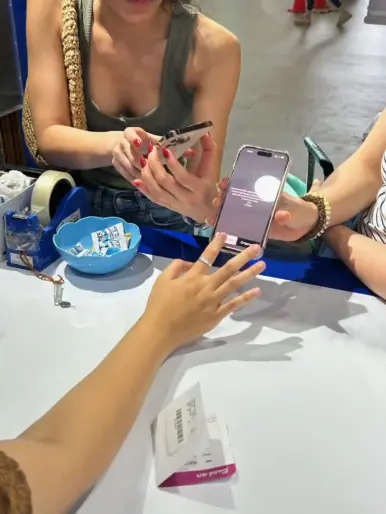
- Complete activation. Staff can assist with registration, activation, APN or mobile-data settings, and a connection test.
Activation time depends on correct customer information, device compatibility, and the operator’s system. Do not leave the counter until you have tested mobile data. For more detail, see the step-by-step Bali Airport pickup guide and the explanation of SIM registration and IMEI rules.
Official pickup location and contact details
Pickup location: I Gusti Ngurah Rai International Airport, Jln I Gusti Ngurah Rai, Badung, Bali 80361, Indonesia
Phone and WhatsApp: +62 851 2358 3773
Email: cs@simcardairportbali.com
Business hours: Daily, 4:00 AM – 2:00 AM the following day.
Check the official pickup location page before travelling in case operating details change.
Common mistakes to avoid
- Ordering before confirming that the phone is unlocked.
- Assuming every version of a phone supports eSIM.
- Choosing a plan from an old URL slug instead of the current product name and variation.
- Entering passport, device, or arrival details incorrectly.
- Leaving the counter before testing mobile data.
- Expecting the same speed and signal in every part of Bali.
The complete list of tourist SIM card mistakes covers these problems in more detail.
Frequently asked questions
Can I buy a Bali SIM card before I arrive?
Yes. You can order online, submit the required details, and collect the SIM or receive setup help at the airport. Check the product page for the current order and pickup options.
Do I need my passport?
Bring the passport and phone used for registration. Accurate information is required to complete activation.
How long are the current plans valid?
The current listed SIM and eSIM packages are valid for 28 days from activation.
Will an eSIM work on any phone?
No. The phone must be carrier-unlocked and the exact model must support eSIM. Device support can vary by country or regional model.
Does a local SIM guarantee coverage everywhere in Bali?
No. Signal and speed depend on the operator, location, device, terrain, network load, and other conditions.
Can staff help with activation?
Airport pickup includes assistance with registration, activation, and mobile-data setup. Activation still depends on correct details, a compatible unlocked phone, and the operator’s system.
Choose your plan
Check that your phone is unlocked, choose eSIM or a physical SIM card, and match the quota to how you will use your phone. Then compare the current Bali SIM and eSIM plans and confirm the live price before checkout.


