
Quick answer: check your New Zealand plan before you fly. Spark and One NZ currently list eligible daily roaming in Indonesia for NZ$10 per New Zealand day; 2degrees lists NZ$8. The charge can start when your phone uses data, calls or texts, including background activity. If you want a local Indonesian number, or prefer to compare a fixed data allowance with daily roaming, you can pre-order a local SIM or eSIM and complete registration and activation at the airport counter after Customs.
This guide is for travellers arriving from New Zealand who are deciding between home-network roaming, an international travel eSIM and an Indonesian SIM or eSIM. Operator prices and eligibility can change. Roaming details were checked on 16 November 2026; confirm your account’s current terms before departure.
What New Zealand roaming may cost in Bali
Indonesia is included in the daily roaming destinations listed by Spark, One NZ and 2degrees. Their current headline daily rates differ, and each operator applies eligibility rules:
- Spark: NZ$10 per day on eligible Pay Monthly plans. Daily Roaming can start when you make or answer a call, send a text or use data, including background data. Spark says its roaming day follows New Zealand time.
- One NZ: NZ$10 per day on eligible current Pay Monthly plans. Check your plan and Indonesia’s availability in My One NZ before relying on it.
- 2degrees: NZ$8 per day in listed daily roaming destinations, including Indonesia. Calls, texts or mobile data can trigger the charge; the day is based on New Zealand time.
These are not universal prices for every customer. Prepay, older plans, add-ons and account settings can change the options. A daily fee can also apply on each NZ calendar day that you use roaming, even if Bali is several hours behind New Zealand. Check your plan’s local-time charging window and what counts as use before you travel.
For a short trip, using your existing number and allowance may be worth the daily fee. For a longer stay or heavier data use, compare the total expected roaming charges with the current local packages. Don’t compare only the headline allowance: check voice, SMS, data limits, expiry, hotspot terms and whether the plan includes the services you need.
How to avoid a roaming charge you did not plan for
Daily roaming can be triggered by background data, app refreshes, automatic updates or a call action, depending on the operator. Before landing, review your carrier’s roaming controls. If you do not want to use NZ roaming, turn off data roaming for that line and make sure mobile data is assigned to the line you intend to use. On a dual-SIM phone, also check that automatic mobile-data switching is off if you want to keep data on the Indonesian line.
Keep your New Zealand line active if you need it for calls or verification texts, but read your operator’s rules first. Receiving a text may be treated differently from sending one or using data. Spark, for example, says receiving a standard person-to-person text does not activate Daily Roaming, but other triggers and voicemail settings can. Do not assume that rule applies to another carrier.
Choose roaming, a travel eSIM or a local SIM
Use your New Zealand plan
Roaming is convenient when you want to keep one number and your eligible plan’s daily fee fits your budget. Check the Indonesia destination listing, plan eligibility, activation trigger and daily time window. For Spark, One NZ and 2degrees, the listed daily rates currently range from NZ$8 to NZ$10, before any separate charges that may apply to your account.
Use an international travel eSIM
A travel eSIM can suit a phone that supports eSIM and an unlocked device. Many travel eSIMs provide data only, so they may not replace your New Zealand number for calls or texts and may not provide an Indonesian +62 number. Check the provider’s network, allowance, validity, hotspot terms and activation instructions. Some can be installed before departure; follow that provider’s instructions rather than assuming every eSIM works the same way.
Use a local Indonesian SIM or eSIM
A local line can be useful if you want an Indonesian +62 number, local calls and SMS, or a package allowance you can compare before travel. Sim Card Airport Bali offers selected XL, Tri and IM3 packages in eSIM and physical SIM formats. Listed packages start with 28 days of validity; later top-ups have their own operator terms. Check the current SIM and eSIM plans for live package options and prices.
Pre-ordering does not activate the local line overseas. Under the current airport pickup process, registration and activation take place at the XL Axiata counter after Customs in Bali. Staff can assist with setup and test the connection at pickup. A local eSIM QR code is issued as part of that in-person process; it is not a remote activation service.
Does your phone support eSIM?
Support depends on the exact phone model and regional variant, and the phone must be carrier-unlocked to use a different provider. Apple says eSIM is available on iPhone XS, XS Max, XR and later models, subject to country and model differences. Apple also explains how to check the carrier-lock status: open Settings → General → About and look for “No SIM restrictions.” Only your current carrier can remove a carrier lock.
Google Pixel and Samsung Galaxy eSIM support also varies by model, market and carrier. Check the manufacturer’s support page for the exact model number, then confirm that the device is unlocked. Our eSIM-compatible device guide is a starting point, not a substitute for checking your phone’s regional specification.
If your phone has one physical SIM slot and eSIM, you may be able to keep the NZ line available while using the Indonesian line for data. The exact dual-SIM features differ by model. Choose which line handles mobile data and review data-roaming and automatic-switching settings before you leave.
When a New Zealand number and a +62 number help
Keep the NZ line if you need calls or verification messages sent to your existing number. A local +62 number can help with local calls, contacting accommodation or drivers, and services that ask for an Indonesian number. App requirements vary, so do not assume every visitor must have a +62 number to use a ride-hailing app. Check the app’s current sign-up and payment requirements for your account and travel situation.
Local tourist SIM and eSIM packages sold here include a +62 number, voice and SMS, subject to the selected operator package. If retaining your New Zealand number matters, confirm that your phone supports the dual-SIM setup you plan to use and that both lines can remain available on your exact model.
What happens at Bali Airport after you land?
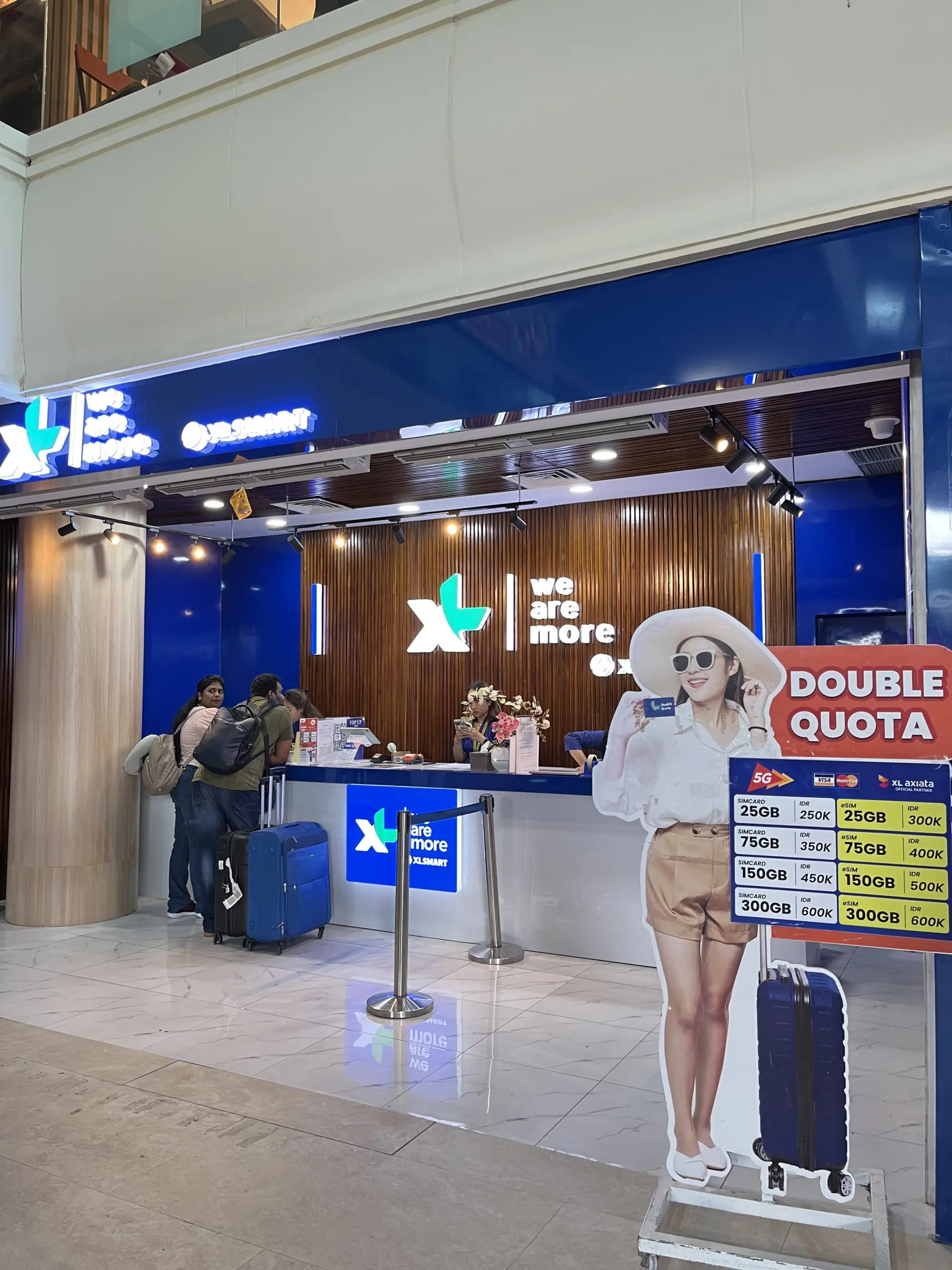
- Complete immigration, collect your bags and pass through Customs.
- Follow the international arrivals exit route to the XL Axiata counter on the left side of the exit.
- Show your order confirmation and passport. Have a screenshot of your phone’s IMEI information and a selfie with your passport ready for the operator’s registration process.
- Staff assist with the SIM or eSIM setup, registration and connection check before you leave the counter.
The airport service point is listed as open daily from 4:00 AM until 2:00 AM the following day. Flight delays can be coordinated during opening hours; contact support if your arrival time changes. Check the latest airport directions and contact details before travel. For a wider explanation of operator registration and Customs IMEI rules, read the SIM registration and IMEI guide.
What if the phone is locked or activation fails?
A carrier-locked phone may not accept a local SIM from another network. Ask your New Zealand provider to confirm the unlock status before ordering. The published Refund Policy lists locked or incompatible phones as non-refundable. If a SIM or eSIM fails to activate on a compatible, unlocked phone, contact support with screenshots and order details so the team can assess the issue and applicable remedy. Orders left uncollected for 30 days are also listed as non-refundable. Read the Refund Policy before ordering; its reporting window and eligibility terms apply.
For eSIM, check the exact model and regional variant before purchase. The QR code supplied for this local service is intended for one scan. If installation fails after the code has been scanned, do not keep retrying on another device; contact support with the order details and a screenshot.
Which option makes sense for your trip?
- Choose NZ roaming if keeping your home number is the priority and your eligible daily fee is acceptable for the days you expect to use it.
- Choose a travel eSIM if you mainly need data, your phone is unlocked and compatible, and its network and validity suit the itinerary.
- Choose a local SIM or eSIM if you want a +62 number, local voice/SMS, staff-assisted airport activation or a package you can compare before arrival.
There is no single best option for every New Zealand traveller. Check the total cost for your actual number of roaming days, whether you need to receive NZ calls or texts, your phone’s SIM support and where you will travel in Indonesia. Then compare current products and policies before you order.
Official sources and further reading
- Spark: roaming rates, eligible destinations and activation triggers
- One NZ: Daily Roaming and plan eligibility
- 2degrees: international roaming destinations and daily rate
- Apple: use Dual SIM with eSIM
- Apple: check whether your iPhone is unlocked
- Google: Pixel SIM and eSIM support
- Samsung New Zealand: eSIM support on Galaxy phones
Last reviewed: 16 November 2026. Roaming prices and phone support can change. Confirm current terms with your carrier and device manufacturer before travel.


